Breeze AI
- About
- AI Models
- Prompts
- AI Assistant
- AI Bulk Action
- Build Landing Page
- Translation
- MCP Server
- Store discoverability
About
Breeze AI brings language models into the Magento admin. It’s a part of Breeze Enterprise theme and consists from several parts:
- AI Models — connect one or more providers: OpenAI, Claude (Anthropic) and Gemini (Google).
- Prompts — reusable prompt templates, assigned to the fields they generate.
- AI Assistant — generate or rewrite a single field right from the product, category or CMS page edit form.
- AI Bulk Action — generate and translate content for many products or categories at once, in the background.
- Build Landing Page — turn a text brief into a Content Builder page document.
- MCP Server — expose the store to AI coding agents over the Model Context Protocol.
AI Models
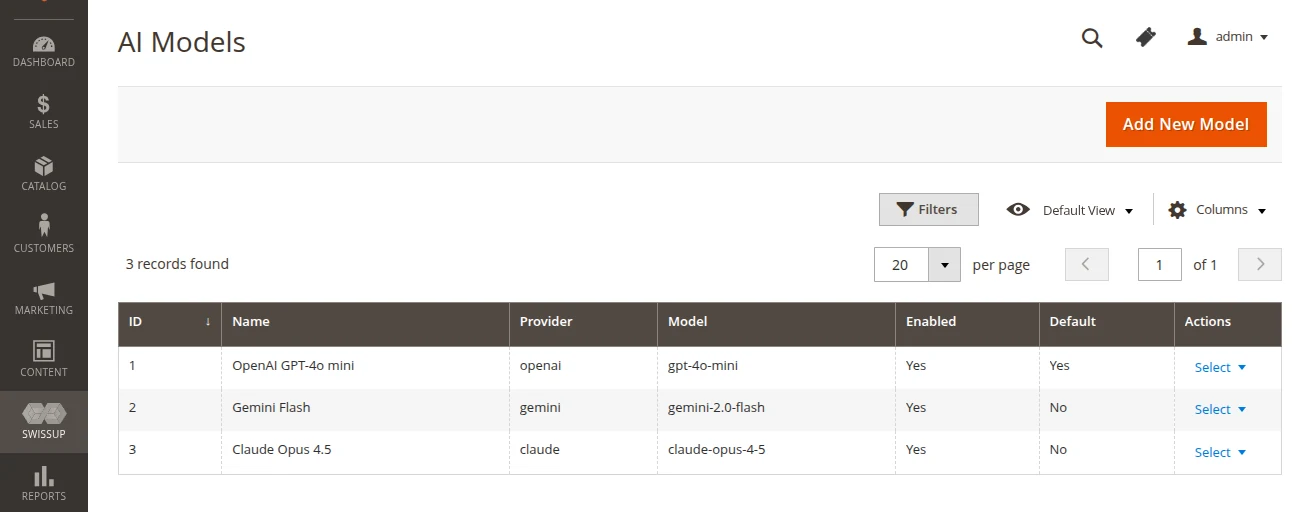
Start with the models. It’s available for all Breeze Enterprise Theme customers under Swissup > Breeze AI > Models menu. Add a model, pick the provider, paste the API key and mark one of them as default — everything else in Breeze AI uses the default model unless a different one is chosen explicitly.
Prompts
Prompts live under Swissup > Breeze AI > Prompts menu. Every prompt is bound to the fields it may write to, so the AI Assistant and AI Bulk Action only offer the prompts that make sense for the field at hand.
AI Assistant
Once a prompt is assigned to a field, an AI button appears next to that field on the product, category and CMS page edit forms. The button opens a chat popup — pick a predefined prompt or type your own request, keep refining the answer in the same conversation, then click Apply to write the result into the field.
AI Bulk Action
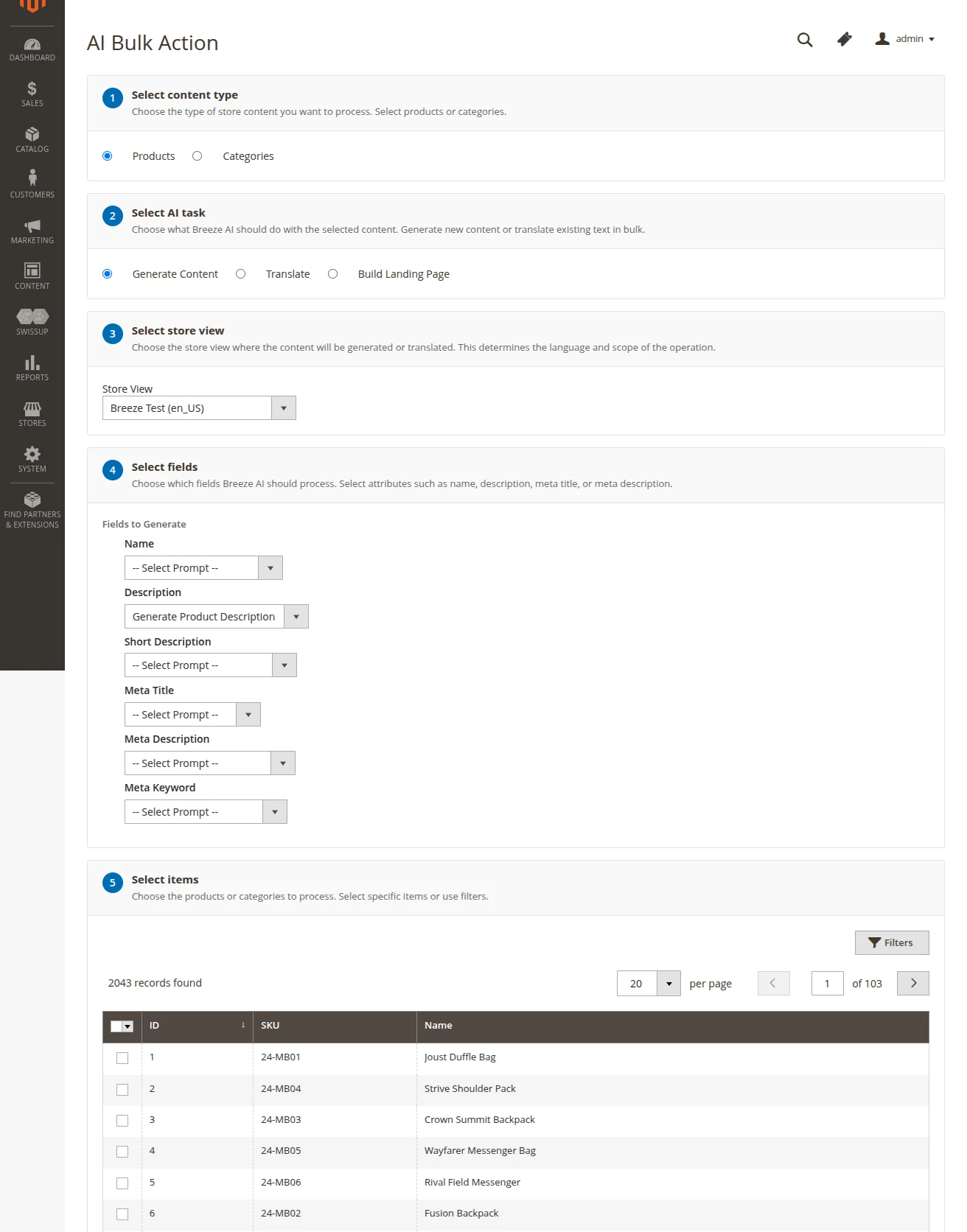
Bulk generation is available under Swissup > Breeze AI > AI Bulk Action menu. The page is a step-by-step form, and every step only appears once the previous one is answered:
- Select content type — products or categories.
- Select AI task — Generate Content or Translate.
- Select store view — the language and scope of the operation. Translate asks for a source and a target store view instead of a single one.
- Select fields — the attributes to process, with a prompt picked per field.
- Select items — the grid, where the products or categories are picked by hand or narrowed down with filters.
Then hit Run. The jobs are dispatched to a Magento message queue, so the admin session isn’t blocked and the progress can be watched under System > Bulk Actions. The consumer has to be running:
bin/magento queue:consumers:start swissup.breezeai.product.attribute.update.consumer
Build Landing Page
Since 1.0.12 Breeze AI can compose a whole page instead of a single field. Give it a brief in plain language and it returns a Content Builder document — the components, already validated against the ones the store actually has — for a CMS page:
bin/magento breezeai:page:build --brief "Landing page for the summer sale: hero, three benefits, product carousel, newsletter form"
The command prints the components as JSON and nothing is written to the database, so the result can be reviewed before it’s saved as a draft. Useful options:
--page-id— an existing CMS page to take the title and URL key from, as extra context for the model.--model-id— a specific AI model instead of the default one.--show-catalog— print the component catalog exactly as the model receives it, and exit. Handy when the generated page keeps missing a component you expected.
The skill needs Swissup_BreezeContentBuilder installed — there is nothing to
compose a page from without it — and it works on CMS pages only, so it isn’t
part of the products and categories flow above.
Translation
Translation is a skill of its own, not a separate screen. It reads the value of an attribute in the source store view, translates it into the locale of the target store view and writes the result back to that store view — available both from the AI Assistant popup and from AI Bulk Action.
MCP Server
Breeze AI also works the other way around: instead of calling a model from the
admin, it lets an AI coding agent — Claude Code, Cursor, Cline, Windsurf —
call the store. The endpoint is POST /rest/V1/breezeai/mcp and it exposes four
tools: generate, translate, list_prompts and graphql for read-only
catalog access.
graphql forwards the query to the storefront GraphQL endpoint without an auth
header, so it sees what a guest sees. Read-only there is enforced rather than
assumed — the tool reads the operation type of the document and rejects anything
but query and fragment definitions, so a mutation never reaches the store.
generate and translate do write, which is what they are for.
The endpoint is enabled by default. To register an agent, generate a token:
bin/magento breezeai:mcp:setup
The command creates a permanent, revocable integration scoped to
Swissup_BreezeAi::manage and prints a ready-to-paste connection command. On
Magento 2.4.4+ integration tokens have to be allowed as bearer tokens:
bin/magento config:set oauth/consumer/enable_integration_as_bearer 1
bin/magento cache:flush
The endpoint can be switched off, and the GraphQL URL used by the graphql tool
can be overridden, under Stores > Configuration > Swissup > Breeze AI > MCP
Server — the override is needed when the server can’t reach itself by its
public URL, for example with Varnish in front or inside docker.
Store discoverability
Two read-only endpoints help external AI agents and crawlers understand the
store without any configuration: /llms.txt describes the store in plain text,
and /.well-known/ai-plugin.json advertises the GraphQL API as a plugin
manifest.